Need more info or you couldn't find what you were looking for, let us know by sending an email to: support@dancik.com.
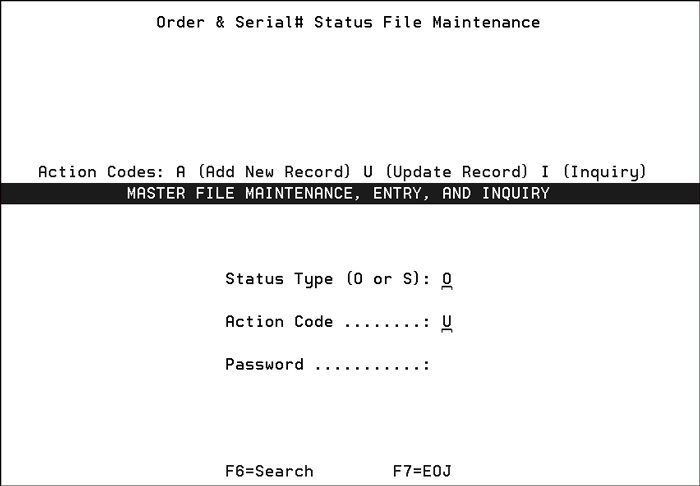
This file enables the viewing and maintenance of the descriptions of both system-defined and user-defined status codes. These codes provide accurate information on the status of open orders and serial numbered items. Colors can also be used for serial number identification purposes.
You can choose to work with Order Status codes or Serial # Status codes.
The following figure is an example of the status codes that can be used for open orders.
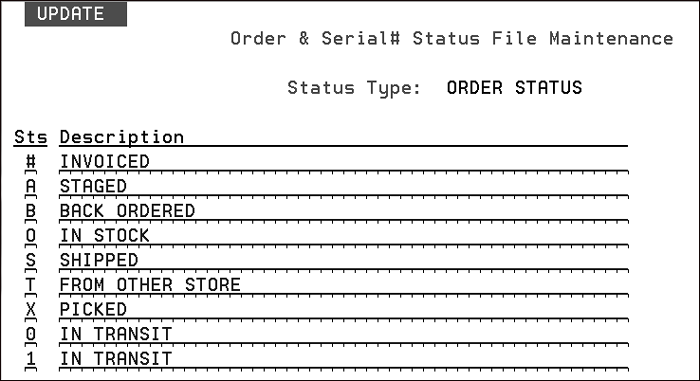
Status codes are created via menu option SET 7. Order & Serial# Status File Maintenance file.
This option can be used to override the status code description for both order (O) status codes and serial number (S) status codes.
The symbol and description are both printed on the order. Using the example shown above, if the order is a transfer; "T - Being Transferred" is printed on a Decor 24 order.
Options for Decor 24 Order Release “Duplicate Order Warnings”
Decor 24 User Settings (D24 2)
F13 Function Key - Submitting Price Catalogs
Super User Settings
Company/Branch Settings (D24 4)
Displaying Decor 24 Usage Stats
Decor 24 Web Services