
Working with Item Cross References - WM2 10
The EDI and Bar Code File Maintenance menu provides a quick and easy way to cross reference UPC and item numbers. You do not have to have the system generate UPC numbers in order to store them. You can store UPC numbers for any manufacturer.
UPC codes can be assigned to an item number here or on the via the UPC Code field at the bottom of the Item File Profile screen (FIL 2).
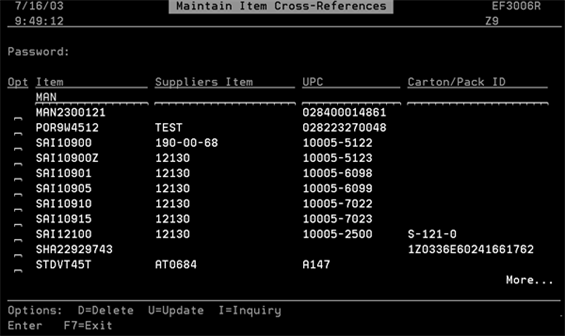
- The Maintain Item Cross-Reference screen that appears shows all items assigned UPC numbers.
- In some cases, another digit is added to the end of the UPC code. This is a system assigned check digit. When you see this number it means the system has validated the UPC number. If for some reason there isn't a check digit, you need to go back and confirm your entries (UCC code and RN number).
- To manually change an item's information, enter a U in the appropriate Opt column and press Enter.
- Change the information as needed. The Carton/Pack ID field is another way to cross reference an item. This field is not restricted so you can enter it in any format that your supplier uses. Generally, if a manufacturer uses UPC codes, the UPC codes are printed on each carton and the Carton/Pack ID field is not needed. However, the Carton/Pack ID field is useful for items that have no UPC codes.
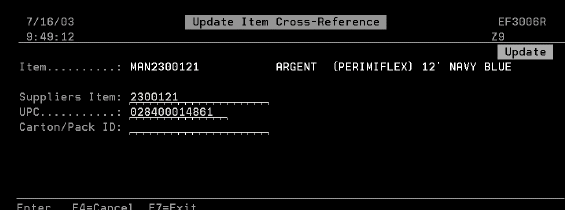
Be careful when manually changing UPC information. If the system cannot validate the new information, you will receive an Invalid Check Digit message at the bottom of the screen.
If a cross reference between a UPC code and a Kerridge item number exists, whenever the UPC code is scanned using an RF device, the Kerridge item number appears.
If a cross reference hasn't been established between a UPC code and a Kerridge item number, an error message appears.