
Credit Approval of Orders
When Credit Checks are Performed
Controlling Credit Approval
There are two basic methods of controlling credit approval during the Order Entry process:
Method 1
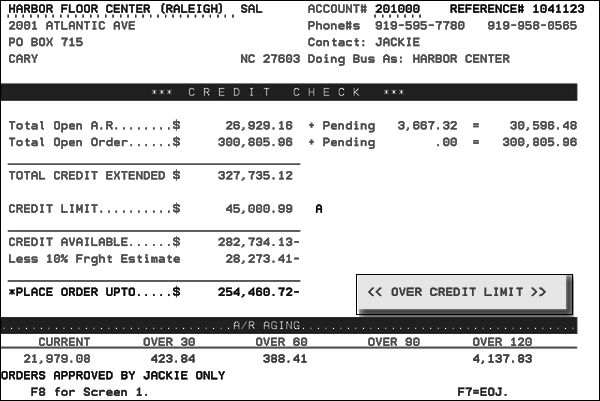
Credit information is displayed as the first screen in Order Entry. If account exceeds credit limits, then the order can not be entered until the Order Entry operator has a manager release the account, by temporarily removing the credit code in the Billto File. Orders are rechecked after the order is entered, in case the order just entered put the account over its limit.
The Credit Information screen is activated via option 2 - A/R and Credit Options on the Company Settings (Menu option SET 3).
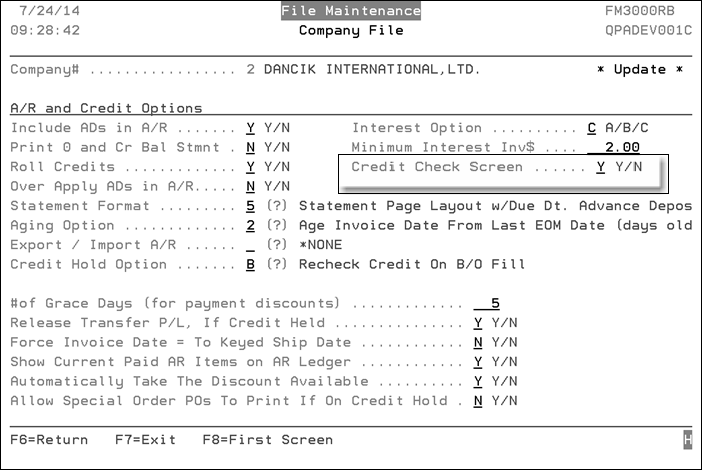
If you plan to use method 1, then all orders can begin with an automatic Credit Check Screen. This screen shows the account's current open receivable, open orders, credit limit, AR aging summary and other information about the account. The screen also shows how much credit remains or how much the account is over their credit limit.
Method 2
No credit information is displayed during the Order Entry process. However, after each order is entered, it is credit checked and automatically diverted to the Credit Held Orders screen, which is maintained by the credit manager. Picking lists do not print until the credit department approves and releases the order. A message is shown to the order entry operator stating This Order Diverted To Credit Dept. A list of credit held orders can build up on the Credit Held Orders Screen. Each order can be reviewed and optionally released by authorized credit personnel. The credit manager can also add messages to the order, change terms and other information, and add extra collection amounts to COD orders. A notification that an order has just been diverted to credit can also print automatically.
All credit checks match the total credit extended against the credit limit. Follow this formula: Credit Extended = Total Accounts Receivable + Total Open Orders.
If you plan to use method 2 (release orders from the Credit Held Orders Screen) then:
- There is a Company-Setting (menu option SET 3) that causes order entry to automatically bypass the credit screen, which is unnecessary when using method 2.
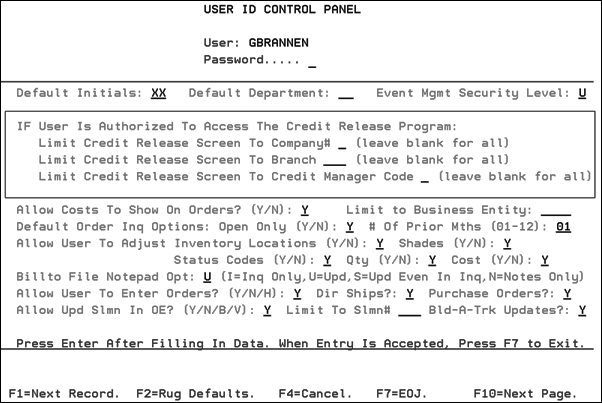
- Use the User ID Control Panel Program (menu option SET 2) to establish parameters for each credit manager. This program contains a screen for each user ID, which can limit the Credit Held Orders screens to a specified company, branch, and/or credit manager code.
Credit Codes
Credit Codes are entered in the Billto File.
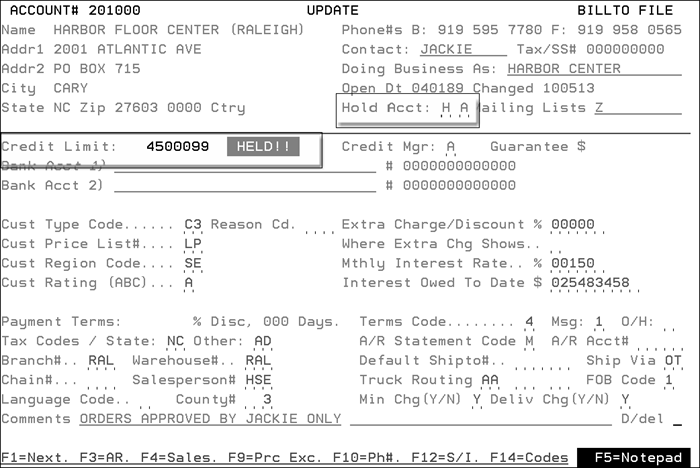
First Character
- H - Account is on hold. No further orders can be taken.
- C - Account can only order up to their credit limit. When the account comes within ten percent of its credit limit, the system automatically prevents further orders from being taken for the account. Note: Using code C does not check if the account is past due.
- 6 - Account can only order up to their credit limit and, additionally, cannot order if they have more than $5.00 over 60 days old in accounts receivable. This is defined as either 60 days past the invoice date or 60 days past the due date, depending upon your system aging option. If account meets either of these conditions, no further orders can be placed.
- 1 - Same as above for code 6, except over 15 days old.
- 3 - Same as above for code 6, except over 30 days old.
- 9 - Same as above for code 6, except over 90 days old.
- 0 - Same as above, except it applies to all invoices that are past due. Invoices greater than zero days past due cause new orders to be sent to credit hold.
- X - Causes the system to use the account number in the customer's AR Xref field to check credit.
Second Character
- A - Causes credit holds to be performed after an order is entered. The order entry operator is able to fully process all orders, but those orders with credit problems are automatically diverted to the credit manager's attention and put into a credit hold status. Once in credit hold status, the credit department reviews the orders and releases them, if approved. Alternately, the credit department may cancel them and notify the customer and/or customer service representative. Credit held orders can be viewed/released from the Held Orders/Credit Release Screen.
- B - Causes credit holds to be performed before an order is entered. The order entry operator is unable to process orders if credit hold takes effect. Use this method if you do not have a credit department or manager, or if you prefer to have the order entry operator interrupted to resolve the credit issue prior to keying the order. If you leave this field blank, B is the default.
The Billto File also contains a second, qualifying character in the Credit Hold field. This character is referred to as the Credit Hold Qualifier Code. This can be B or blank for method 1 (for verifying the customer's credit before the order is entered) or A (for verifying the customer's credit) after the order is entered, which is described above as method 2.
When Credit Checks are Performed
The system automatically performs a credit check during the following processes:
- When an order is started, accounts are checked for the H credit hold code and a B credit hold qualifier code. This procedure stops orders coded with H and B from even being entered. If you use method 1 as described above, then the customer's credit is verified before allowing an order to be placed.
- If you use qualifier code A, then the customer's credit is verified after the order is entered. At that time, the order is either diverted to the credit department or it bypasses the credit department if the order passes all credit check logic.
- When an order is completed, a credit check is performed prior to processing or printing the order.
- When an order is changed after it has been approved by the credit department, and its value has increased, a credit check is performed. The credit department is notified by a display of Order Chg on the Credit Held Orders Screen. The credit department still needs to release this order to remove it from their Credit Hold Screen. If the credit department does not approve the changed order for shipment, then they must retrieve all documents already printed in the warehouse to prevent shipment.
- When a back order is filled, a credit check can be performed. This feature is optional, and is only activated by a company settings option.