Need more info or you couldn't find what you were looking for, let us know by sending an email to: support@dancik.com.
Use this option to transfer cash from one account to another. All transfers create two transactions:
1 A positive transfer— to transaction
2 A negative transfer—from transaction
The sum, or net result, of these transactions is always zero. No separate edits or updating is required. The system examines field entries and verifies them on screen. If acceptable, the transactions are immediately posted and inquiries and reports reflect the transfer.
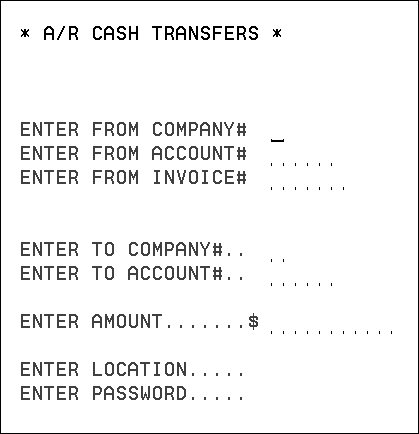
1. On the Accounts Receivable Menu, enter option 4 - Transfer Cash, and press Enter. The AR Cash Transfer appears.
2. Enter the information and press Enter.
3. If all of the field entries are acceptable, the system prints a message saying, “transfer successful, “and lists the names of the to and from accounts.
The Transfer Cash program also creates a report showing details of each transfer entered. The report is kept on hold in the Print Spool file so they can be discarded, or released and printed. The file name of the report is TRFRCASH.
Note: These transactions are also shown on the end-of-month reports. However, the daily report shows an in-depth before and after record.