Need more info or you couldn't find what you were looking for, let us know by sending an email to: support@dancik.com.
Managing Samples
This guideline discusses the multiple methods of managing samples in the system from tracking the samples to recording it on the GL. Some of the procedures outlined in this document may be different than your current process and therefore may require you to change your current processes.
The following are some of the recommended options you can use to track samples. Each option discusses how you can post samples as sample expense or as inventoried items.
Option #5 - Tracking Samples Using Business Entities
Note: Make sure you understand the different methods before implementing any of the options shown.
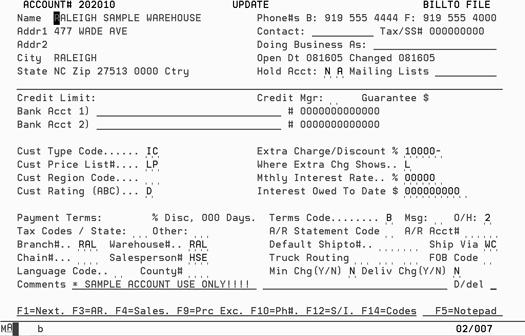
If you do not have any inter-company transactions, you can use this option to manage samples by creating a Customer File for samples.
Assign the inter-company customer type code IC to the sample customer file account numbers.
Note: By using the customer type IC, you can map your Sales to GL for customers with IC to post to GL for sample expense. Only a customer type IC can be mapped separately. If you have actual intercompany sales, then you should not use this method.
Create a Billto Customer File for use of samples. Ex: you may create an account for each branch that gives out samples or create an account for each salesperson that takes samples.
Use this account for any item taken from inventory as samples.
You can run reports against this account to see all the items selected against this account that were pulled for samples.
You can run reports against this account to create your use tax reports if you receive your samples in at a cost.
Orders entered for samples are treated like any other order, where you can use any document, change order status, and invoicing the sample order.
Potential obstacles
Online sales analysis and report statistics will include the sample account. If you invoice the sample items at zero pricing and the sample have cost, then online statistics and reports are affected by this negative margin. (This may actually be an advantage, depending on how you want to calculate margin).
Make sure that only sample accounts have “IC” customer type.
When you only sell in full cartons, there is potential of multiple open cartons due to samples taken from the full carton through the sample account.
Since any item can be a sample, your inventory value includes all items.
If you prefer to have samples separated from your main warehouses, you can create a sample warehouse for every warehouse that has samples.
Create a sample warehouse.
Assign the sample warehouse to another company in the warehouse file.
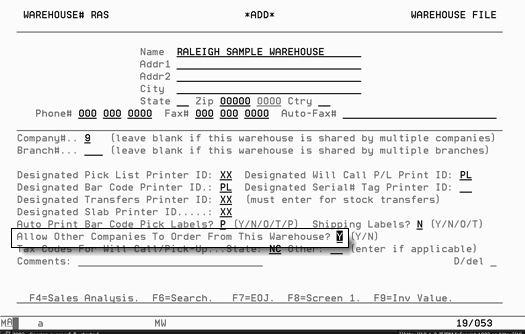
Eliminate or include the sample warehouses from inventory inquiry screen using warehouse matrix.
Note: By assigning the sample warehouse to another company, inventory value for the sample warehouse will not be part of the regular company inventory value.
Use inventory adjustments to move the materials from a regular warehouse to a sample warehouse. If you use the same adjustment code, for example “S”, to record this movement, you can map your Inventory to GL Interface to code these adjustments to sample expense.
You can run use tax reports against the sample warehouses for materials taken from the sample warehouse.
You know how much in samples you have at all times in a sample warehouse. You can run a sample warehouse value report.
Orders entered for samples are treated like any other order, where you can use any document, change order status, and invoicing the sample order.
You can run reports against this warehouse to see all the items selected against the warehouse pulled for samples.
If you sell in full cartons and someone breaks the carton, you can move the broken carton to the sample warehouse.
Inventory value does not include samples as part of the company inventory value.
Potential obstacles
Online sales analysis and report statistics will include the sample warehouse. If you invoice at zero price and the sample item has a cost, then online statistics and reports are affected by this negative margin. (This may actually be an advantage.)
Requires an additional step of adjusting materials out of one warehouse and into another warehouse.
Warehouse documents show “transfer from sample warehouse”, even though sample inventory is in the same physical warehouse, if you are mixing stock and samples on same order.
If you have displays and item numbers that are strictly used for samples, you need to have an item number for every sample item inventory.
Create the sample items with their respective MFGR code.
Create product line samples (XXXSAM where XXX is MFGR code). Creating product line, you can run reports with any product line SAM. You could also use item class 1 in the Item File to indicate the item as a sample item.
Assign cost center samples (SAM) to all sample item numbers. This allows you to map the activities of the sample items by cost center to the proper GL account number when you sell a sample item or adjust a sample item number. You can map the cost centers to sample expense or affect inventory GL account.
You can run use tax reports for all sample items invoiced.
Orders entered for samples are treated like any other order, where you can use any document, change order status, and invoice the sample order.
You can run reports for all sample items to see all the sales activity for the sample item numbers.
Potential obstacles
Online sales analysis and report statistics will include the sample item numbers. If you invoice the sample items at zero pricing and the samples have a cost, then online statistics and reports are affected by this negative margin. (This may actually be an advantage.)
Requires an additional step of adjusting materials out of regular item and into the sample item number.
Some products, such as carpet, commonly use unique item numbers. However, other products do not have unique sample item numbers. The samples just come out of a carton of the regular item.
Sample Tracker is a add-on utility to track samples. If you have a showroom environment where you require a deposit on all samples, want to keep track of which customers (on account or general public) that have not returned samples, and you do not consider item numbers as important, then you should consider using the add on feature of Sample Tracker. Using Sample Tracker designates that you have expensed all your samples.(Review the Sample Tracker best practice and Sample Tracker Reference Guide before implementing this option.)
Can check item in and out of sample department easily, using barcoding.
Can create customers on demand.
Can create items on demand.
Accepts deposits.
Prints memos to customers
Review overdue memos
Invoice overdue memos
Online sales analysis and report statistics do not include anything done in Sample Tracker. This is an advantage if you do not want to include sample information in your reports.
Potential obstacles
Any sales done through Sample Tracker need to be recorded in the system manually or by entering the total sample sales for the month as one lump sum. You cannot use the regular order entry and invoicing programs with Sample Tracker.
Cannot run use tax reports.
Very limited sales reporting capabilities on items taken as samples.
Option 5 - Tracking Samples Using Business Entities
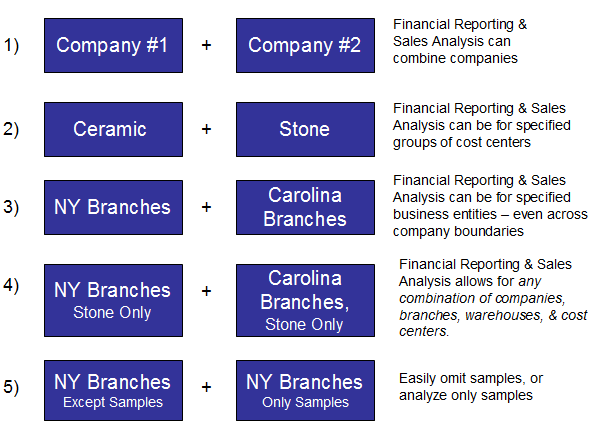
Business Entities allow reports to be run that (a) include only samples, (b) exclude samples, or (c) include both samples and all other products. To use this process effectively, samples must be in inventory, and sample orders should be keyed separately (not combined on the same order with other items), and those sample orders should all use special header warehouse codes - that represent actual sample warehouses or virtual sample warehouses.
Consolidation & Reporting Rollup Options Using Business Entities
1. Create a virtual warehouse (SAM) for the sale of samples (or one virtual sample warehouse per branch/store)
2. Create a Business Entity that includes only the sample warehouse(s)
3. Create a Business Entity that omits the sample warehouse(s)
4. Create a Business Entity that includes all warehouses (sample and regular warehouses)
5. Various reports, including X By Y and financial statements, can be run by selecting a Business Entity
6. Reports can be run that include samples, omit samples, or only include samples
7. Business Entities can also be created for any combination of company, branch, cost center, and warehouse
Note: If the approach outlined below is used, it covers "no charge" as well as billable samples, as long as they are processed using regular order & invoicing processes.
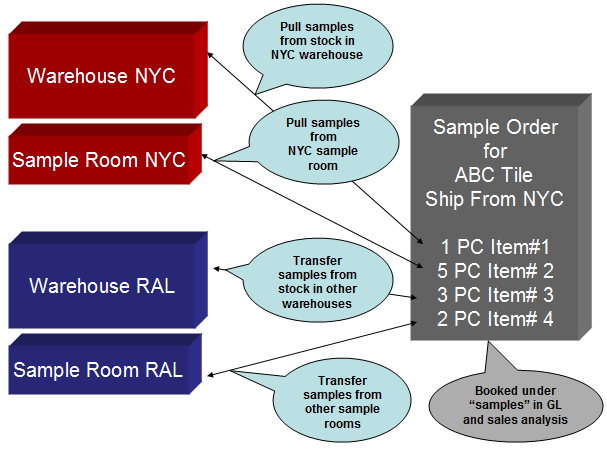
Samples & Cost Of Sales “Sample Warehouse”
1. Create virtual warehouse (SAM) for the sale of samples (or one virtual sample warehouse per branch/store)
2. All sample orders must specify warehouse “SAM” on header
3. This can be used for any customer or any internal requisition
4. Then select samples in Order Entry from any/all real warehouses
5. All pick documents will reflect “transfer to samples”, and will have the correct bin locations and pick units (CT + Pieces)
6. Set Dancik General Ledger Interface so that all orders with “sample warehouses” are categorized under the appropriate sales & cost of sales accounts for samples
7. This method works for ANY type of sample including “grab a piece out of any open carton”
8. This method requires that samples are kept as inventory items
The following are discussions on topics that you should review. Your decisions concerning each topic can impact your processes, possibly causing you to change the way you handle samples.
Topic |
Considerations |
Sales Analysis |
Do you want samples to affect online sales analysis screens? |
Sample Cost |
Do you want to receive samples in the system with a cost? |
Pick List |
Do you need to print pick list to ship samples? |
Deposits |
Do you take deposits for samples? |
Reporting |
What kind of reports are you looking to have for samples? |
Use Tax |
Do you have to report use tax on samples given to customers? |
Inventory |
Do you keep samples in inventory, or do you expense them? |